Aller au contenu
WordPress.org

Français de Belgique

  • Thèmes
  • Extensions
  • News
  • À propos
  • Meetups
  • Traduction
  • Vitrine (complète)
  • Contact
  • Get WordPress
Get WordPress
WordPress.org

Plugin Directory

WP ShareX

  • Submit a plugin
  • My favorites
  • Log in
  • Submit a plugin
  • My favorites
  • Log in

Cette extension n’a pas été testée avec plus de trois mises à jour majeures de WordPress. Elle peut ne plus être maintenue ou supportée et peut avoir des problèmes de compatibilité lorsqu’elle est utilisée avec des versions de WordPress plus récentes.

WP ShareX

Par joomdev
Télécharger
  • Détails
  • Avis
  • Installation
  • Développement
Support

Description

WP ShareX is an advanced WordPress Social Share plugin enables you to add social share buttons on Posts and pages. You can assign buttons on Top of the Content, Bottom of the Content, Sidebar and on media.

Features of WP Social Share by JoomDev
1. 24 Social Network
2. You have the option to select either Icons or Icons with Text
3. 3 Button Shapes
4. 4 Button Animations
5. URL Shortening Option with Bitly and Goo.gl
6. Embed Twitter Handle and desired tags with Tweet
7. 4 Button display Location e.i. Top of the Content, Bottom of the content, Media, and Sidebar
8. Hide On Mobile Ability
9. Default Share Count Option. (You can play with your user’s mind)
10. Encourage your Audience to share your content with Share Incentive Feature

Captures d’écran
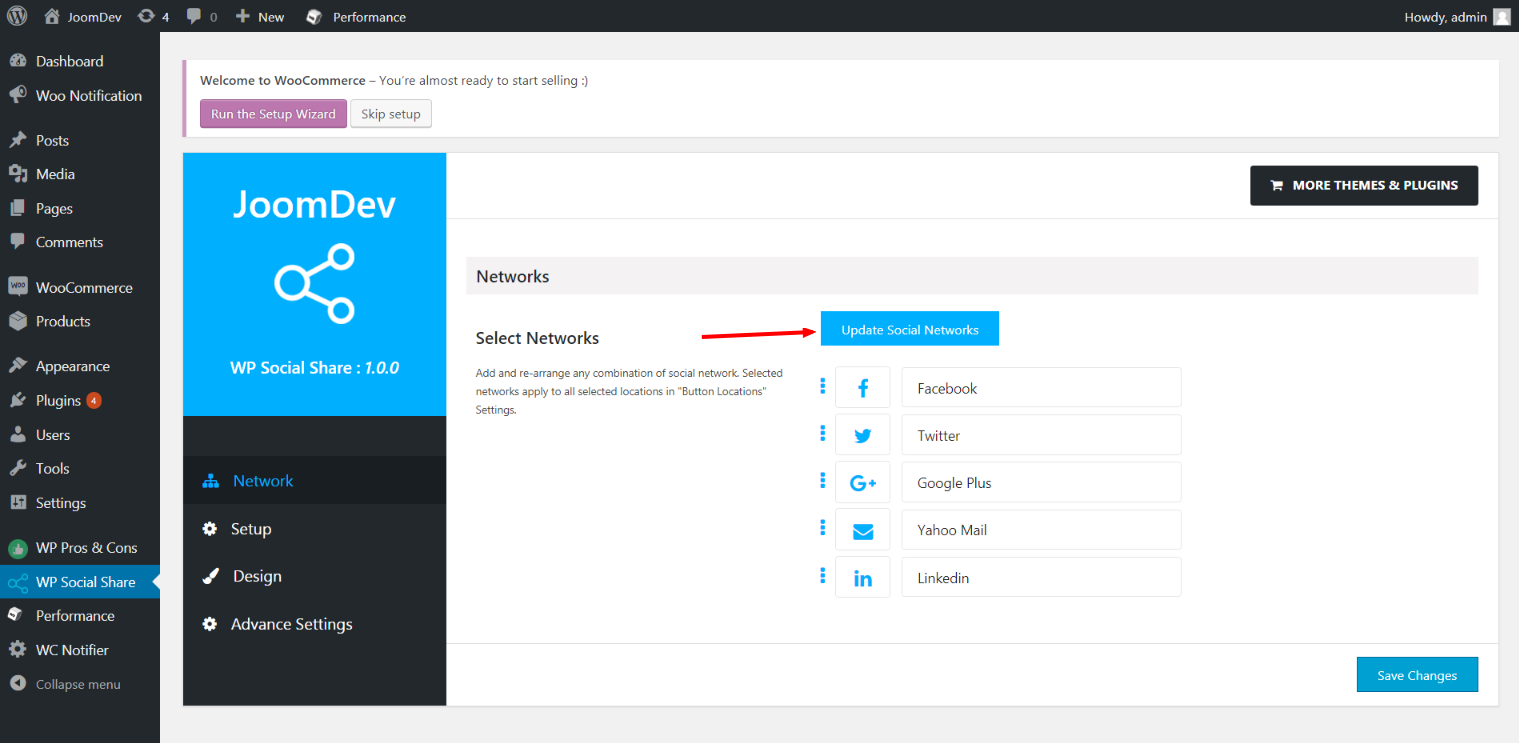
Click here to select networks
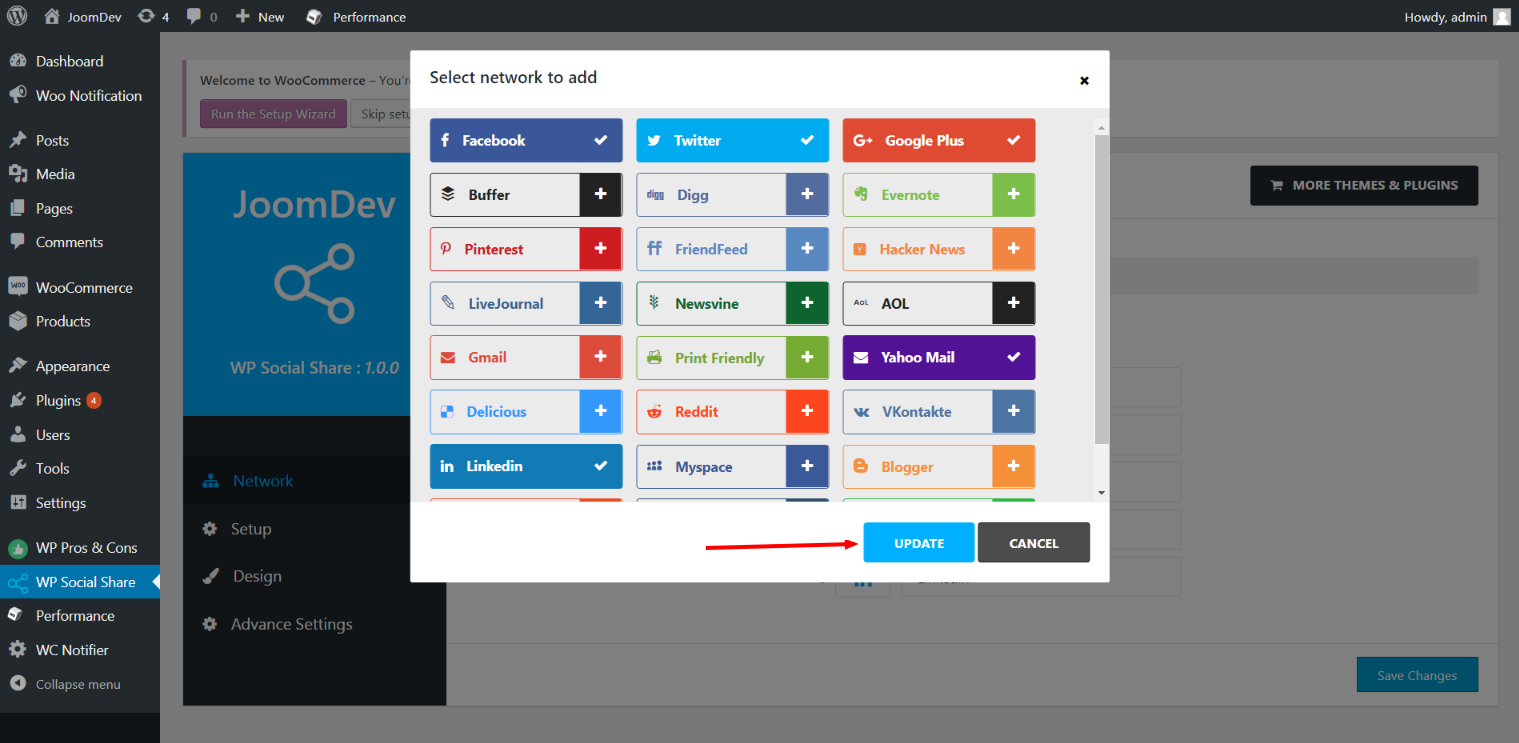
Update networks after selecting them.
Setup plugin and api settings.
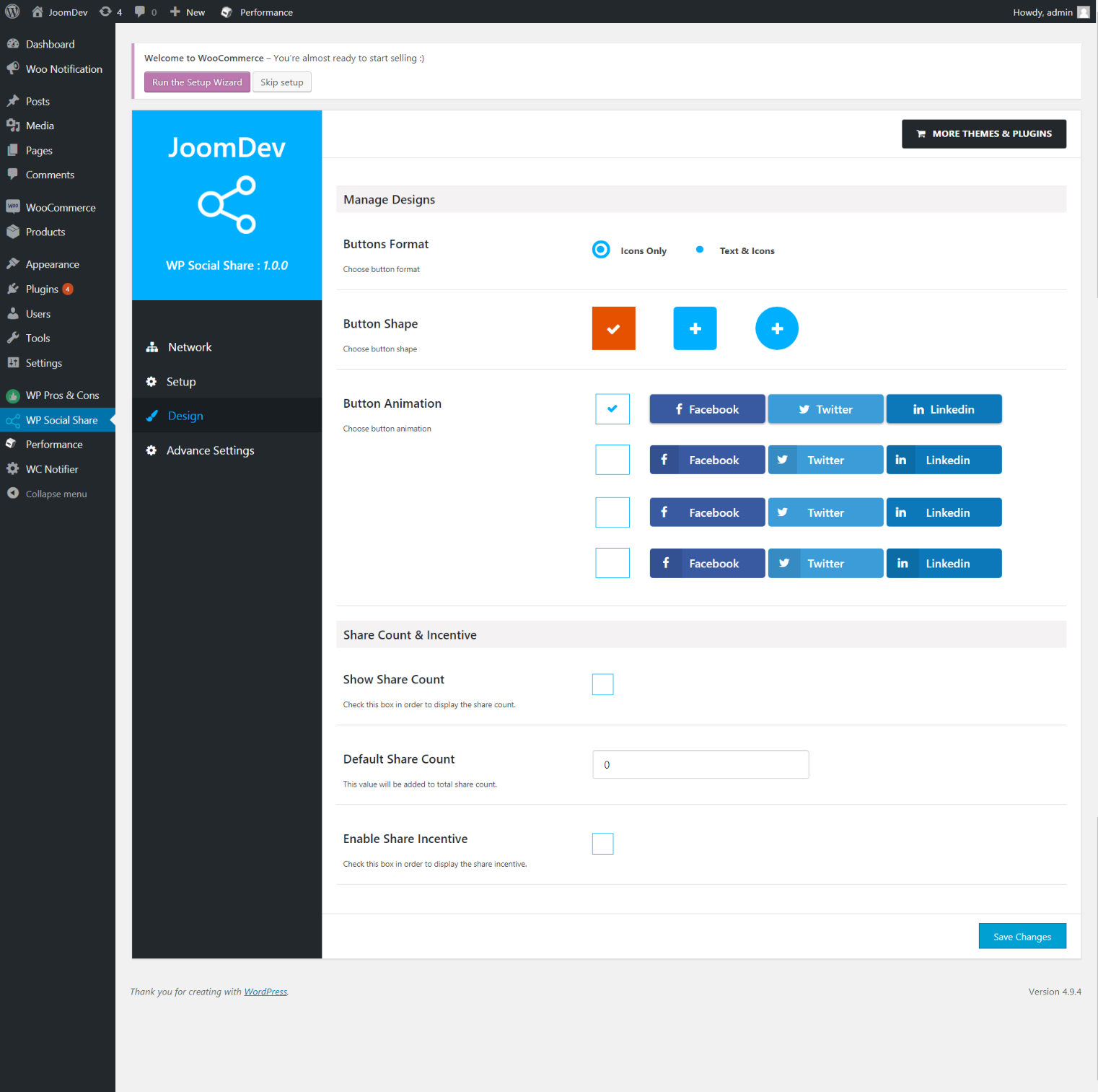
Select any design to display the buttons.
For mobile
For mobile

Installation

Way 1: 1. Upload joomdev-wp-social-share.zip to the /wp-content/plugins/ directory 2. Extract the zip file. 3. Activate the plugin from wordpress plugins page. And you have done.

Way 2: 1. Go to plugins page in admin. 2. Click on Add New button. 3. Search for « WP ShareX ». 4. Click install on WP Social Share. 5. Activate the plugin.

FAQ

Installation Instructions

Way 1:
1. Upload joomdev-wp-social-share.zip to the /wp-content/plugins/ directory
2. Extract the zip file.
3. Activate the plugin from wordpress plugins page. And you have done.

Way 2:
1. Go to plugins page in admin.
2. Click on Add New button.
3. Search for « WP ShareX ».
4. Click install on WP Social Share.
5. Activate the plugin.

How do I use this plugin?

See description.

Avis

Excellent!

Arnab Mohapatra 16 mars 2018 1 reply
Incredible plugin. It allows to add any sharing button on the page simply and fast!
Lire l’avis

Contributeurs & développeurs

« WP ShareX » est un logiciel libre. Les personnes suivantes ont contribué à cette extension.

Contributeurs
  • joomdev

Traduisez « WP ShareX » dans votre langue.

Le développement vous intéresse ?

Parcourir le code, consulter le SVN dépôt, ou s’inscrire au journal de développement par RSS.

Journal

1.0.0

  • New Plugin initialized.

Méta

  • Version 1.0.0
  • Last updated il y a 8 années
  • Active installations 10+
  • WordPress version 3.0 ou plus
  • Tested up to 4.9.29
  • Language
    English (US)
  • Tags
    sharesocialsocial share
  • Vue avancée

Notes

5 out of 5 stars.
  • 1 5-star review 5 stars 1
  • 0 4-star reviews 4 stars 0
  • 0 3-star reviews 3 stars 0
  • 0 2-star reviews 2 stars 0
  • 0 1-star reviews 1 star 0

Your review

See all reviews

Contributeurs

  • joomdev

Support

Quelque chose à dire ? Besoin d’aide ?

Voir le forum de support

Faire un don

Souhaitez-vous soutenir l’avancement de cette extension ?

Faire un don à cette extension

  • About
  • News
  • Hosting
  • Privacy
  • Showcase
  • Themes
  • Plugins
  • Patterns
  • Learn
  • Support
  • Developers
  • WordPress.tv ↗
  • Get Involved
  • Events
  • Donate ↗
  • Five for the Future
  • WordPress.com ↗
  • Matt ↗
  • bbPress ↗
  • BuddyPress ↗
WordPress.org
WordPress.org

Français de Belgique

  • Visit our X (formerly Twitter) account
  • Visit our Bluesky account
  • Visit our Mastodon account
  • Visit our Threads account
  • Visit our Facebook page
  • Visit our Instagram account
  • Visit our LinkedIn account
  • Visit our TikTok account
  • Visit our YouTube channel
  • Visit our Tumblr account
Le code est une poésie.
The WordPress® trademark is the intellectual property of the WordPress Foundation.