

Description
WP Child Theme Generator is a powerful yet beginner-friendly WordPress plugin that lets you create a child theme from any installed WordPress theme — no coding required.
Whether you’re a developer or just getting started, this plugin makes it easy to create and customize child themes with just a few clicks. It’s perfect for anyone who wants to safely modify theme files without affecting the parent theme.
📽️ Video Tutorial – How to Generate a Child Theme?
🔧 Two Easy Ways to Generate a Child Theme
🟢 One-click Child Theme Generator – Instantly create a basic child theme with default settings.
⚙️ Custom Child Theme Creator – Modify child theme details like name, version, author, and author URL before generating.
With these flexible options, you can quickly build a child theme and start customizing your website safely and efficiently.
✅ Key Features
✔️ Easy-to-use interface – Designed for both beginners and developers
⚡ One-click setup – Create a child theme instantly
✍️ Custom child theme settings – Customize theme name, description, version, author, and more
🧩 Supports all WordPress themes – Works with any theme installed on your site
🚫 No coding required – No need to manually edit functions.php or style.css
🪶 Lightweight & performance-friendly – Won’t slow down your website
💡 Why Use WP Child Theme Generator?
Creating a child theme is considered best practice when you want to:
- Customize theme files without losing changes after updates
- Add custom CSS, functions, or templates safely
- Keep the parent theme untouched for easy maintenance
Whether you’re managing a client site or tweaking your personal blog, WP Child Theme Generator is the hassle-free way to generate a WordPress child theme.
📚 Documentation & Resources
🔗 Plugin Page: https://wensolutions.com/plugins/wp-child-theme-generator/
📖 Full Documentation: https://wensolutions.com/docs-category/wp-child-theme-generator/
🤝 Support & Feedback
If you love this plugin, please leave us a ⭐⭐⭐⭐⭐ rating!
Need help or have suggestions? Visit the support forum — we’re always happy to assist!
If you have any questions, suggestions, or issues, please contact us here.
Captures d’écran
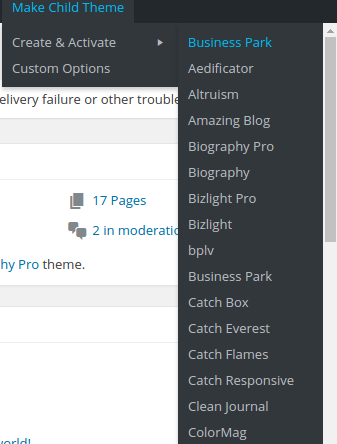
Quick Child theme generate. 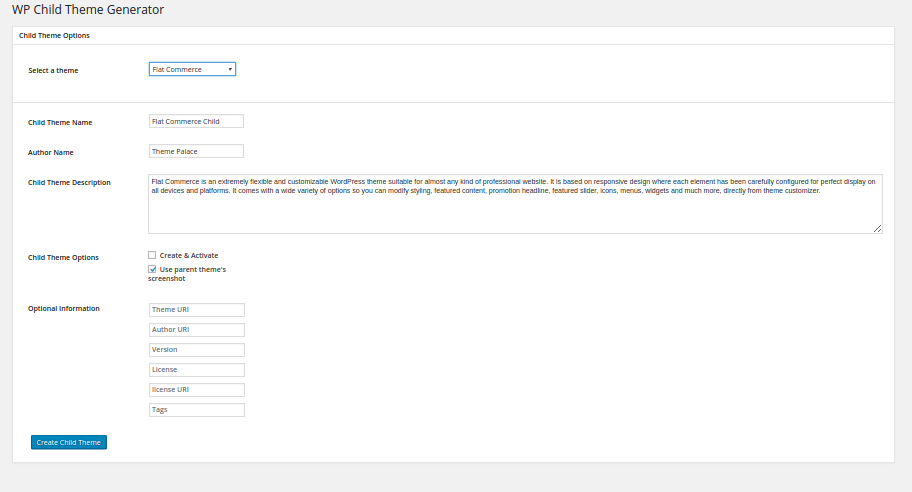
Child theme generate advanced options.
Installation
Using The WordPress Dashboard
- Navigate to the ‘Add New’ in the plugins dashboard
- Search for
WP Child Theme Generator - Click
Install Now - Activate the plugin on the Plugin dashboard
Uploading in WordPress Dashboard
- Navigate to the ‘Add New’ in the plugins dashboard
- Navigate to the ‘Upload’ area
- Select
wp-child-theme-generator.zipfrom your computer - Click ‘Install Now’
- Activate the plugin in the Plugin dashboard
Using FTP
- Download
wp-child-theme-generator.zip - Extract the
wp-child-theme-generatordirectory to your computer - Upload the
wp-child-theme-generatordirectory to the/wp-content/plugins/directory - Activate the plugin in the Plugin dashboard
FAQ
-
1. Can I safely delete the parent theme after creating a child theme?
-
No. The child theme depends on the parent theme for its core functionality and styling. Deleting the parent theme will break the child theme. Always keep the parent theme installed and updated.
-
2. Will I lose my customizations if I update the parent theme?
-
No. That’s the main benefit of using a child theme. All your customizations made in the child theme remain intact even when the parent theme is updated.
-
3. Does this plugin work with any WordPress theme?
-
Yes. WP Child Theme Generator supports all themes installed on your WordPress site, including third-party and custom themes.
-
4. Can I uninstall the plugin after creating a child theme?
-
Yes. Once the child theme is created, the plugin is no longer required for its functionality. You can safely uninstall or deactivate the plugin.
-
5. Do I need coding knowledge to use this plugin?
-
No. The plugin is designed to be beginner-friendly and requires no coding skills. You can create and customize child themes with just a few clicks.
-
6. Will this plugin affect my website’s performance?
-
No. WP Child Theme Generator is lightweight and performance-friendly. It won’t slow down your website.
-
Yes. The plugin offers a Custom Child Theme Creator that lets you modify details such as the theme name, version, author, and author URL before generating the child theme.
Avis


Contributeurs & développeurs
« WP Child Theme Generator » est un logiciel libre. Les personnes suivantes ont contribué à cette extension.
Contributeurs
Traduisez « WP Child Theme Generator » dans votre langue.
Le développement vous intéresse ?
Parcourir le code, consulter le SVN dépôt, ou s’inscrire au journal de développement par RSS.
Journal
1.1.4
Release Date: 23rd July 2025
* Minor security and compatibility improvements
* Tested upto WP v6.8
1.1.3
Release Date: 13th September 2024
* Fixed Arbitrary File Upload issue
1.1.2
Release Date: 20th June, 2
* Minor fix – added condition to check for parent Screenshots
1.1.1
Release Date: 12th June, 2024
* Added a condition to check the file type of the file submitted by form
1.1.0
Release Date: 12th April, 2024
* Fixed plugin general errors
* Fixed Plugin security errors
* Compatibility tested with WordPress 6.5
1.0.9
Release Date: 18th January, 2024
* Compatibility tested with WordPress 6.4.
1.0.8
Release Date: 3rd July, 2023
* Compatibility tested with WordPress 6.0.
1.0.7
Release Date: 17th June, 2022
* Compatibility tested with WordPress 6.0.
1.0.6
Release Date: November 26, 2020
* Fixes: Fatal Error if theme name consist dot. character. When Clicking Create & Activate with that type of theme name, then it gives fatal error.
1.0.5
Release Date: December 3, 2019
* Compatibility Tested upto 5.3
1.0.4
- Compatibility Testing.
1.0.3
Release Date: 11th July, 2019
Fixes:
* Minor PHP Notice fixes.
* Compatibility tested upto WordPress 5.2.2.
1.0.2
- Adding missing file.
1.0.1
- Made the plugin compatible with WordPress 4.6
- Added pointers for better instructions and explanation of settings.
1.0.0
- First release