
Description
If you translate your site by hand to keep its quality and tone consistent, it is easy to miss a string — a button label, an image alt text, a line somewhere. And every time you change the design, new strings appear that you might forget to translate. TranslatePress shows you one page at a time, so there is no quick way to see what is still missing across the whole site.
Stringwatch adds a Stringwatch tab to the TranslatePress settings. It compares every public page with each of its translations, as a logged-out visitor sees them, and lists every piece of text that is still identical. TranslatePress’ own string tables then tell you why:
- Not translated — TranslatePress knows the text but has no translation.
- Translated, not shown — a translation exists, but the page still shows the original, usually because of a spelling difference such as curly quotes, dashes or HTML entities.
- Not in TranslatePress — the text comes from somewhere TranslatePress does not see, such as JavaScript or another plugin.
Text you deliberately translated to the same words (brand names, « FAQ ») is recognised and hidden automatically.
Features
- Works with any language combination.
- Checks visible text, image alt texts, titles, placeholders, aria-labels, the page title and the meta description.
- Scans only when you open the tab or click Refresh — nothing runs in the background, nothing on the front end changes.
- Results appear while the scan runs.
- Every finding links to the translated page and straight into the TranslatePress editor.
- Re-check a single page after fixing it, without a full scan.
- Header, footer and popup strings are grouped once under « Sitewide ».
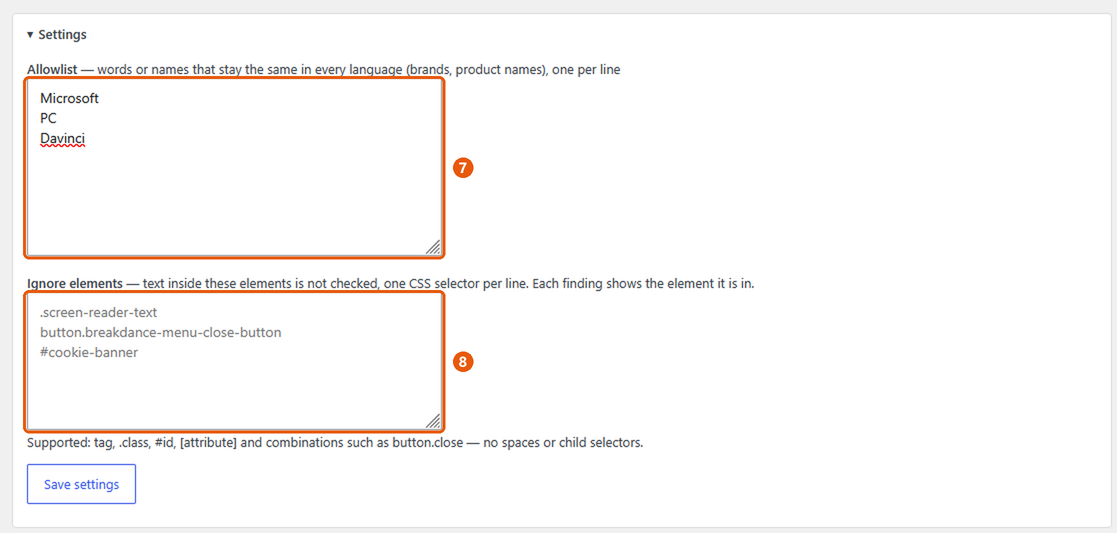
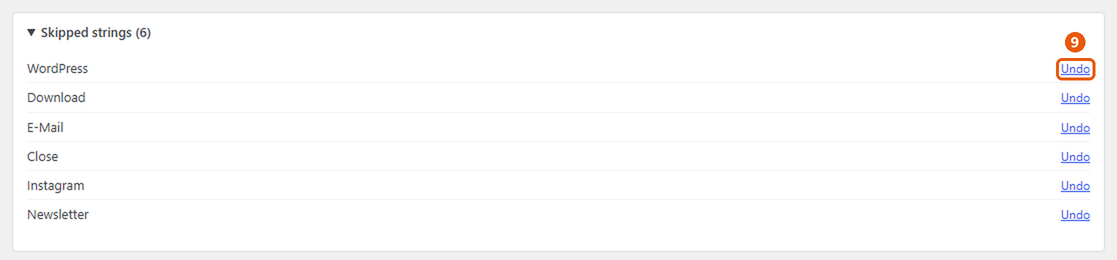
- Skip false positives, keep an allowlist of brand names, ignore whole components by CSS selector, or leave pages out of the scan — all reversible.
- Several translation languages in one scan.
Captures d’écran

Installation
- Install and activate TranslatePress.
- Install and activate Stringwatch.
- Open Settings TranslatePress Stringwatch. The first scan starts automatically.
FAQ
-
Does it work with my languages?
-
Yes. It does not need to understand any language: it compares each translated page with its original and reports text that is still the same.
-
Does it slow down my site?
-
No. It does nothing on the front end. A scan only runs while you have the Stringwatch tab open, and it fetches your pages the way a visitor would.
-
Why are brand names or words like « Download » listed?
-
Some words are the same in both languages, so they look untranslated. Click Skip to hide them, or add brand names to the allowlist under Settings.
-
Yes. Each finding shows the element it is in. Add that element to « Ignore elements » under Settings, and its text is no longer checked. To leave a whole page out of the scan, use « Ignore page ».
-
How long does a scan take?
-
It depends on the number of pages and your host. Pages are fetched several at a time; results appear while the scan runs.
-
Does it change my translations?
-
No. It only reads. You fix translations in the TranslatePress editor, as usual.
Avis
Il n’y a aucun avis pour cette extension.
Contributeurs & développeurs
« Stringwatch – Untranslated Text Finder for TranslatePress » est un logiciel libre. Les personnes suivantes ont contribué à cette extension.
Contributeurs
Traduisez « Stringwatch – Untranslated Text Finder for TranslatePress » dans votre langue.
Le développement vous intéresse ?
Parcourir le code, consulter le SVN dépôt, ou s’inscrire au journal de développement par RSS.
Journal
0.4.2
- First release on WordPress.org.
0.4.1
- Author: Blue River Growth (bluerivergrowth.com).
0.4.0
- Renamed to Stringwatch – Untranslated Text Finder for TranslatePress (slug and text domain: stringwatch). Settings and scan results are kept.
0.3.9
- « Ignore page » moved to the right, next to « Open in translator ».
- Prepared for the WordPress.org plugin directory.
0.3.8
- « Ignore page » on each page card, with Undo under « Ignored pages ».
- Page-builder template libraries (e.g. Elementor popups and headers) are no longer scanned.
0.3.7
- Fix: « Check again » on Dashboard Updates finds new releases immediately.
- Fix: updates to the screen’s look and behaviour take effect without a hard reload.
0.3.6
- Content aligned with the TranslatePress header and tabs; no line under the re-check icon.
0.3.5
- Plugin icon, shown on Dashboard Updates.
0.3.4
- Re-check icon without underline.
0.3.3
- Re-check button next to each page: checks that one page again after you fixed it in the translator.
0.3.2
- No element label on image findings.
0.3.1
- The element is only shown when it has a class or ID, prefixed with « in ».
0.3.0
- Each finding shows the element it is in; new setting « Ignore elements » (CSS selectors) to stop checking whole components.
0.2.0
- Language-independent detection (page comparison + TranslatePress string tables), several languages per scan.
0.1.0
- First standalone version.