
Description
DMValdez Clean Post Toolkit solves the classic battle between clean site architecture and editor convenience.
When editors use heavy page builders like Elementor on standard blog posts, it creates « div soup, » slows down page loads, and makes future theme migrations a nightmare. This plugin programmatically disables Elementor on the standard post post type and shows a friendly one-time modal explaining why — then hands editors a lightweight Classic Editor toolbar so they never have to reach for a page builder just to add a button or an FAQ.
Everything the toolbar inserts renders as clean, semantic HTML5 — no page-builder markup, no extra database bloat, and styling ships as a single small CSS file shared by the frontend, the block editor, and the Classic Editor’s own WYSIWYG iframe.
What’s included
The Enforcer — removes Elementor support from the post post type only (Pages and custom post types are untouched), and shows a one-time educational modal on post-new.php explaining the policy.
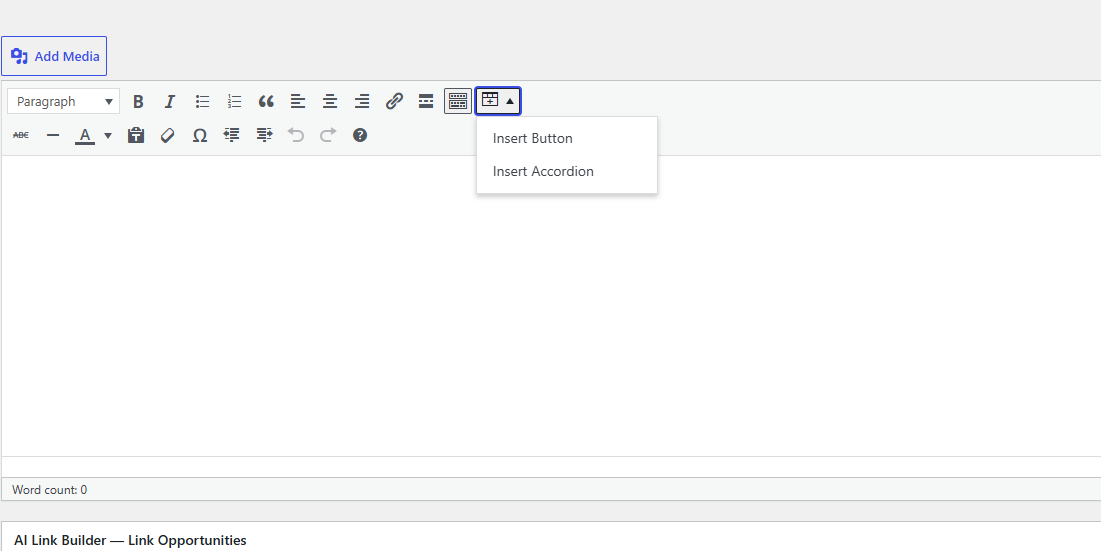
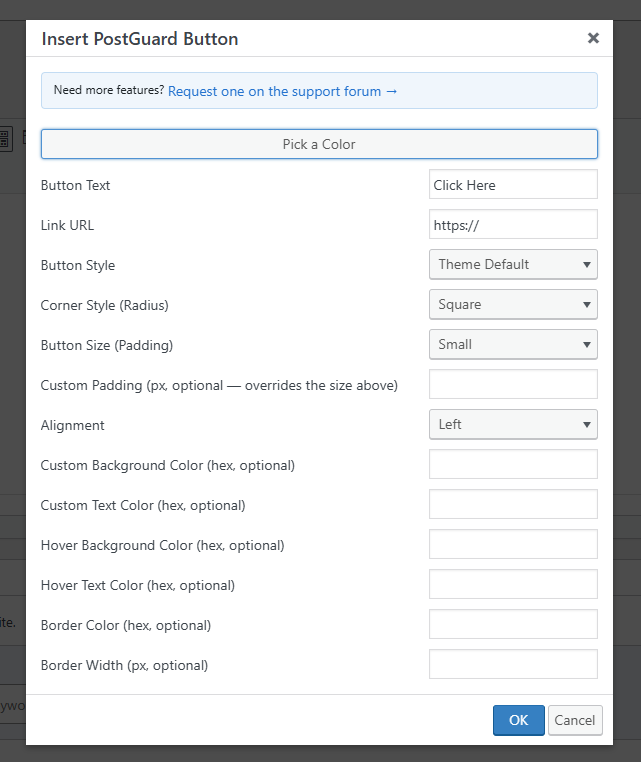
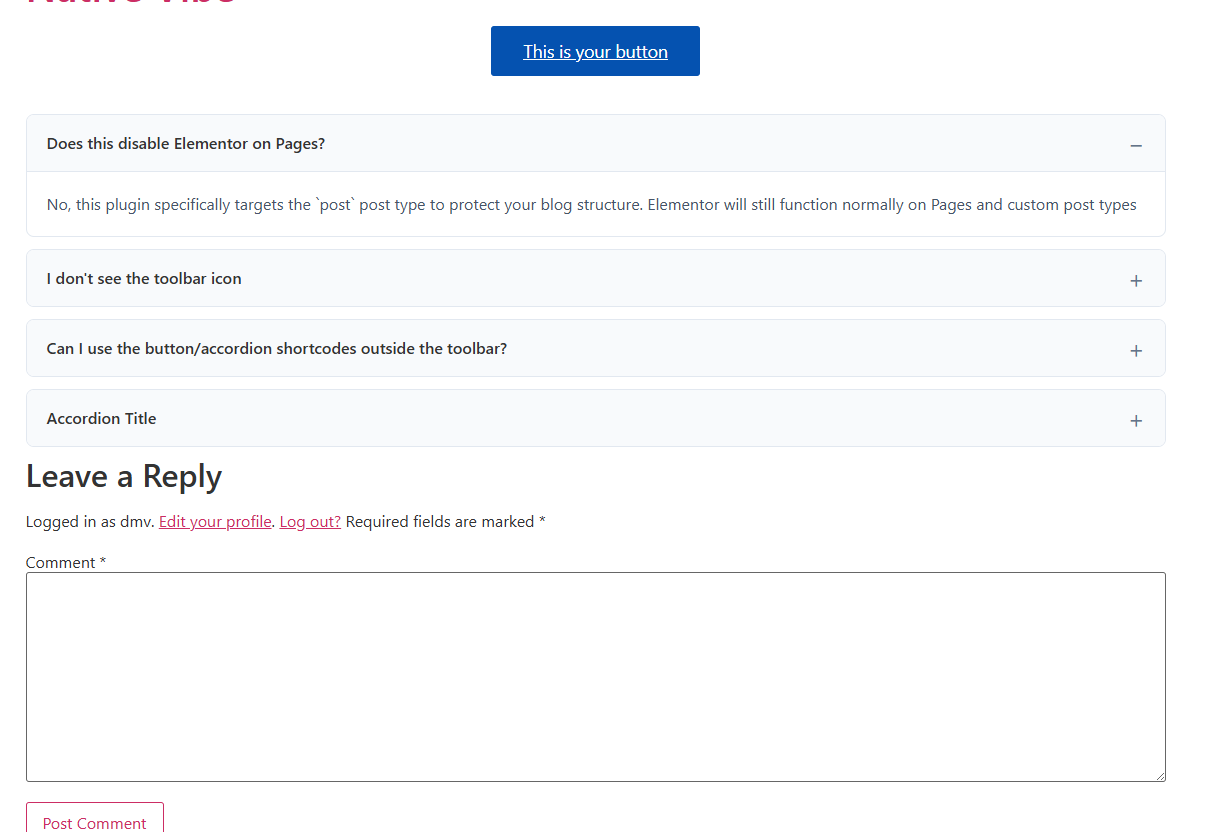
Buttons — [postguard_btn] — a theme-styled button that inherits your active theme’s Elementor button classes, so it looks native even with Elementor disabled. Inserted via a toolbar dialog with a live color-picker popup; every option is optional and defaults to your theme’s normal look:
text,link— button label and URL.style—default(inherits theme),primary, oroutline.radius—square,md(rounded), orpill.padding—sm,md, orlg; orpadding_custom(px) to override with an exact value.align—left,center,right, orfull(full width).bg_color,text_color,hover_bg_color,hover_text_color— hex colors, independent hover state.border_color,border_width— add or override a border on any style.
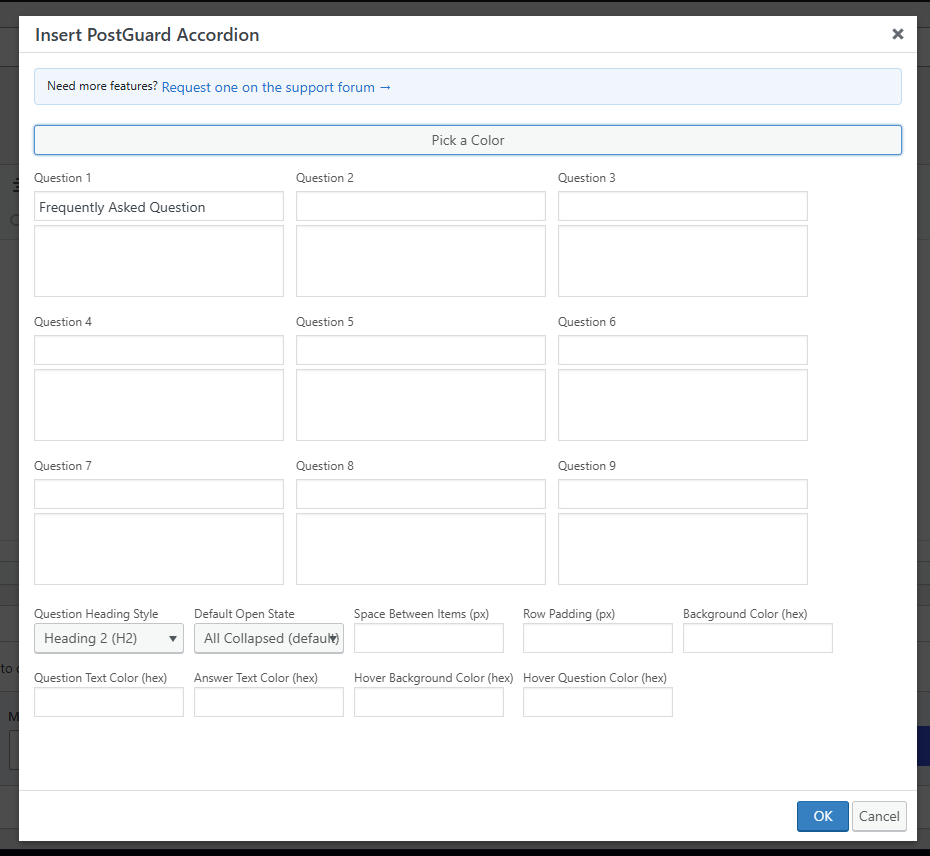
Accordions — [postguard_accordion_group] / [postguard_accordion_item] — pure HTML5 <details>/<summary> accordions, zero JavaScript on the frontend. The toolbar’s « Insert Accordion » dialog builds a full FAQ block in one pass — a 3-column grid for up to 9 question/answer pairs, plus shared styling options:
question_tag— render each question ash2,h3,h4, or plain text (semantically valid — a heading is allowed as the sole child of<summary>).default_state—none(all collapsed),first(first item open), orall(all open) on page load; any individual item can also force itself open withopen="yes".item_spacing,row_padding— px values controlling the gap between cards and internal padding.bg_color,title_color,content_color,hover_bg_color,hover_title_color— hex colors, cascading to every item in the group automatically.
The legacy single-item shortcode [postguard_accordion title="..."]answer[/postguard_accordion] still works standalone for hand-written content.
Code blocks — [postguard_code language="php"]...[/postguard_code] — real syntax-highlighted code, not a plain gray box. Colors ship via a self-hosted copy of Prism.js (no third-party CDN requests) in a dark editor-style theme, with line numbers and a one-click Copy button. Supports Plain Text, HTML, CSS, JavaScript, PHP, Python, SQL, Bash, and JSON. The highlighting assets only load on posts/pages that actually use the shortcode.
Toolbar helpers — a « Pick a Color » popup gives editors a real color picker with a copyable hex readout for any of the fields above, and a « Request a feature » link in every dialog points straight to the support forum.
Requirements
The Classic Editor (either natively, or via the Classic Editor plugin) is required to see the toolbar button — the toolkit hooks into TinyMCE’s mce_buttons/mce_external_plugins filters. Shortcodes themselves render correctly regardless of which editor inserted them.
Captures d’écran

Installation
- Upload the
dmvaldez-clean-post-toolkitdirectory to your/wp-content/plugins/directory, or install the zip directly through the ‘Plugins’ ‘Add New’ screen. - Activate the plugin through the ‘Plugins’ menu in WordPress.
- Open a new Post — Elementor is now disabled for posts, and the toolbar icon appears in the Classic Editor toolbar.
FAQ
-
Does this disable Elementor on Pages?
-
No, this plugin specifically targets the
postpost type to protect your blog structure. Elementor will still function normally on Pages and custom post types. -
I don’t see the toolbar icon
-
Make sure you’re using the Classic Editor (or the Classic Editor plugin with Gutenberg installed) and that « Rich editing » is enabled under your WordPress profile settings — the toolkit only registers its TinyMCE button when both are true.
-
Yes — every attribute documented above can be typed directly into any shortcode, in the Classic Editor’s Text mode, in a Custom HTML block, or in a template via
do_shortcode(). -
A small, dismissible reminder shown on the Dashboard and Plugins screens after you’ve used the plugin for a while. Click the × to dismiss it permanently — it won’t reappear.
-
Can my code snippet contain square brackets, like `$arr[0]` or a regex character class?
-
Yes, in virtually all real-world cases. WordPress only treats
[as the start of a shortcode when it’s immediately followed by a registered shortcode name, so ordinary code brackets are left alone as plain text.
Avis
Il n’y a aucun avis pour cette extension.
Contributeurs & développeurs
« DMValdez Clean Post Toolkit » est un logiciel libre. Les personnes suivantes ont contribué à cette extension.
Contributeurs
Traduisez « DMValdez Clean Post Toolkit » dans votre langue.
Le développement vous intéresse ?
Parcourir le code, consulter le SVN dépôt, ou s’inscrire au journal de développement par RSS.
Journal
1.3.1
- Initial public release on WordPress.org.
- The Enforcer: removes Elementor support from standard posts (Pages and custom post types unaffected), with a one-time educational modal explaining why.
- Buttons (
[postguard_btn]): theme-matched by default, plus custom colors with independent hover states, border color/width, alignment (including full width), and custom padding. - Accordions (
[postguard_accordion_group]/[postguard_accordion_item]): multi-item FAQ blocks built from a 3×3 quick-entry grid in the toolbar, default open-state control, custom spacing, and cascading colors. The single-item[postguard_accordion]shortcode is also available for hand-written content. - Code blocks (
[postguard_code]): real syntax highlighting via a self-hosted Prism.js — dark theme, line numbers, one-click copy, line wrapping — for Plain Text, HTML, CSS, JavaScript, PHP, Python, SQL, Bash, and JSON. - A dismissible « leave a review » notice on the Dashboard and Plugins screens.