
Description
The Pixel Manager is the most complete conversion tracking plugin for WooCommerce. Set up Google Ads conversion tracking, Google Analytics GA4 e-commerce tracking, Meta/Facebook Pixel, TikTok Pixel, and more – in minutes, not hours. No coding required.
Unlike Google Tag Manager (GTM), which requires significant technical expertise to configure WooCommerce e-commerce tracking correctly, the Pixel Manager provides a turnkey solution with over 12 years of development. It automatically handles edge cases like payment gateway redirects, order duplication prevention, and consent mode – all the things that take hours to get right with manual tag management.
🆕 New: Conversion tracking for OpenAI ads on ChatGPT
OpenAI is rolling out advertising on ChatGPT, and the Pixel Manager is one of the first WooCommerce plugins to support it. The free version installs the OpenAI browser pixel with the full shopping funnel, and the Pro version adds a server-side Conversions API connection and Advanced Matching – so you can measure exactly which purchases your ChatGPT ads drive, from day one. Also new: Microsoft Clarity heatmaps and session recordings (Pro, beta), and the rebuilt, faster Nova admin interface (free).
🚀 Endorsed by Google’s Tag Team
This plugin was recommended to us by Google’s Tag Implementation Team. That should say enough.
This plugin was demonstrated to me by a Google Tagging Support person. ‘nough said 🙂
We’re using this for our biggest clients and it’s working great!
Pixel Manager for WooCommerce is the go-to plugin for both tech wizards and casual users.
What makes the Pixel Manager different?
Most WooCommerce tracking plugins only handle the basics: firing a conversion pixel on the thank you page. The Pixel Manager goes much further. It tracks the entire e-commerce customer journey – from product impressions and add-to-cart events through checkout and purchase – across all major advertising and analytics platforms simultaneously. This gives you complete data for conversion optimization, dynamic remarketing audience building, and accurate ROAS reporting.
The Pro version adds server-side tracking (Conversion API / CAPI) that sends conversion data directly from your server to advertising platforms. This bypasses browser limitations like ad blockers, Safari ITP cookie restrictions, and network issues – typically recovering up to 30% more conversions that browser-only tracking misses. Our unique Automatic Conversion Recovery (ACR) feature goes even further by automatically identifying and recovering missed conversions nightly.
Avantages clés
✅ Easy setup – just enter your tracking IDs and you’re done.
✅ Accurate e-commerce event tracking across all platforms.
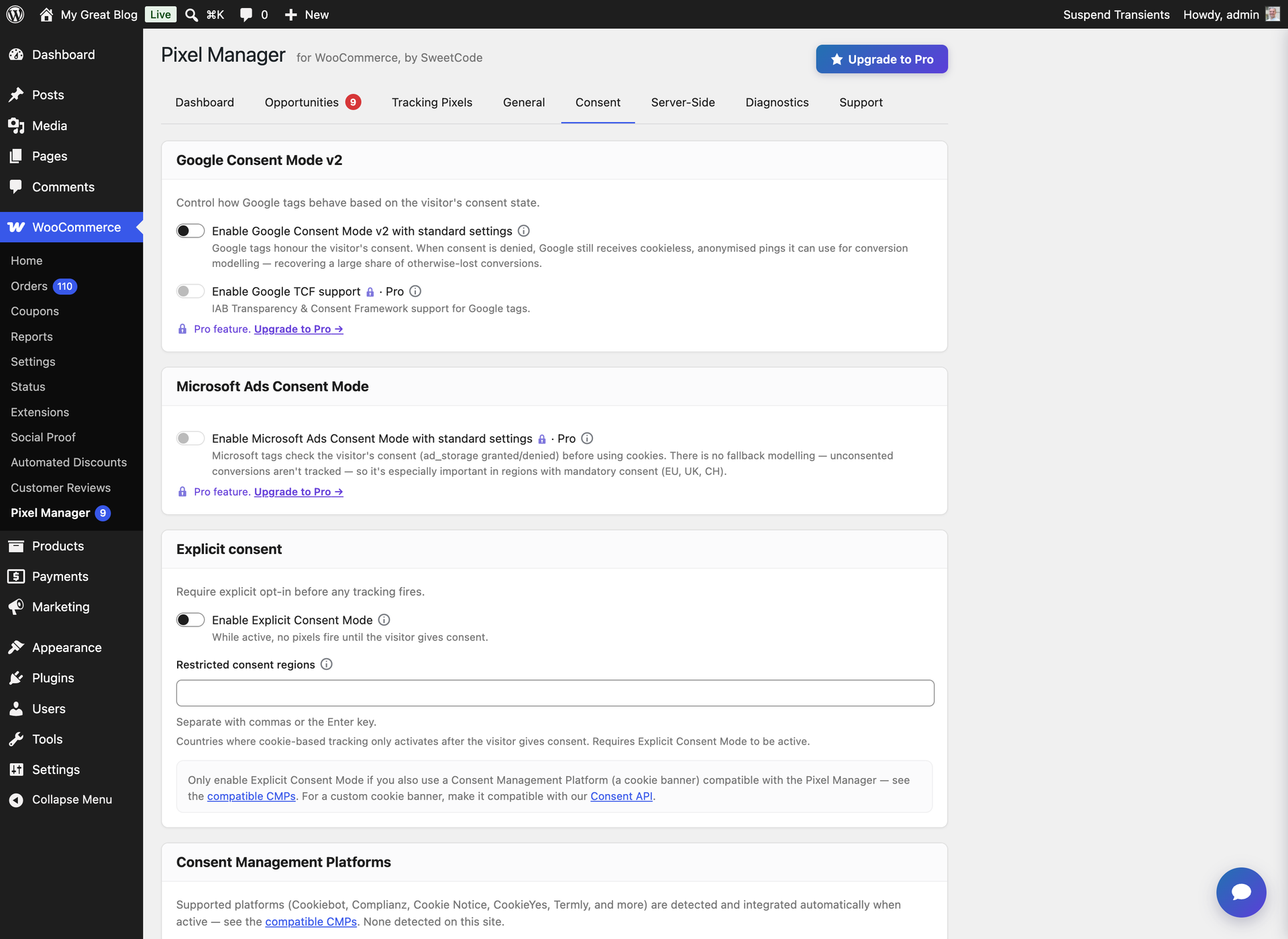
✅ GDPR and CCPA compliant with Google Consent Mode v2.
✅ Works with 15+ consent management platforms out of the box.
✅ Lightweight – won’t slow down your WooCommerce store.
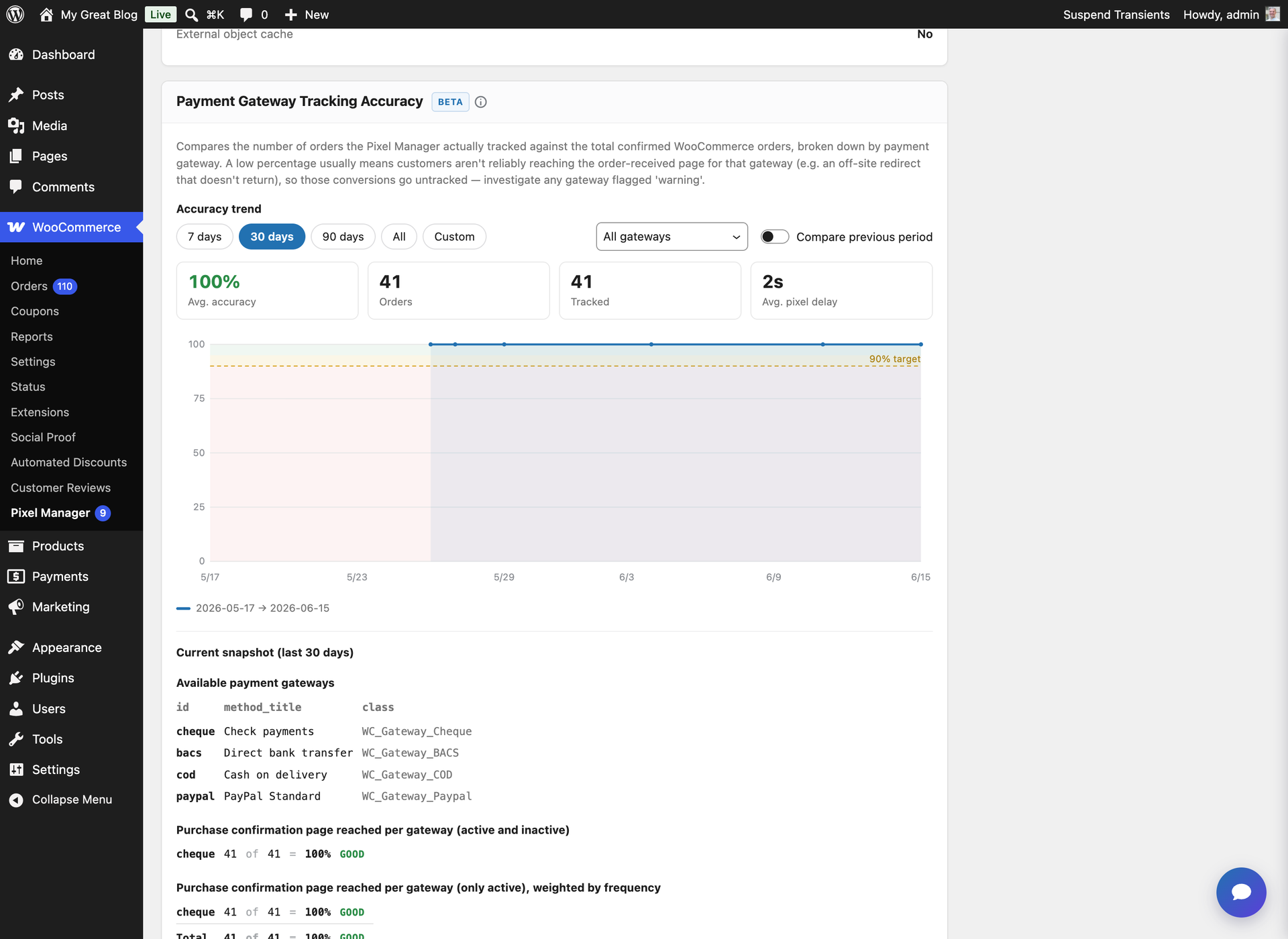
✅ Payment Gateway Accuracy Report – diagnose conversion tracking drops.
✅ Automatic Conversion Recovery (ACR) – recover lost conversions (Pro).
✅ OpenAI ads (ChatGPT) conversion tracking – browser pixel free, server-side (Pro).
✅ AI-ready – AI agents can safely configure the plugin through the WordPress Abilities API.
Free Tracking Pixels
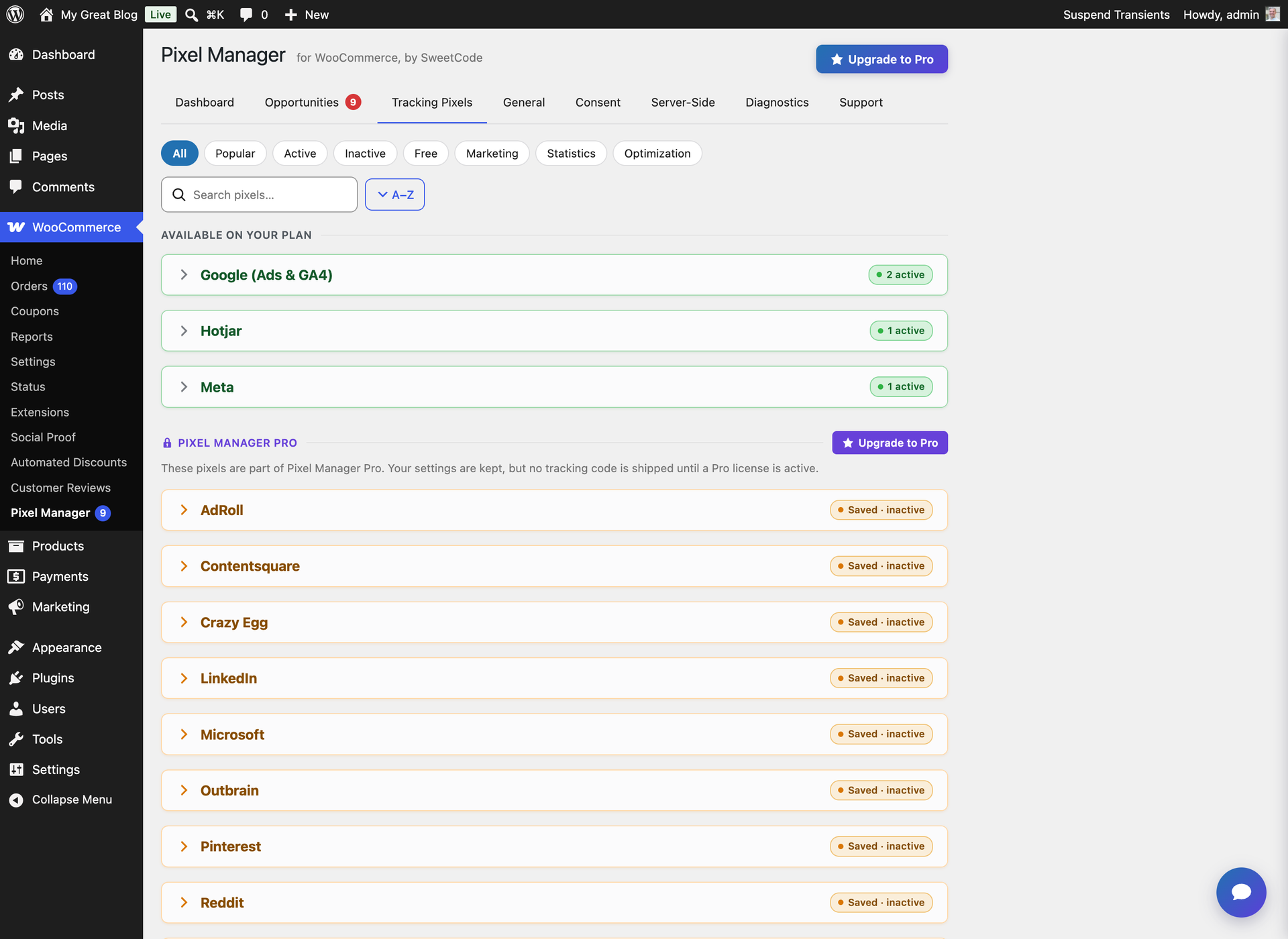
- Google Ads Pixel – conversion value tracking, dynamic remarketing, cart item data
- Google Analytics Pixel (GA4) – full Enhanced E-Commerce tracking
- Meta Ads Pixel (Facebook Pixel) – remarketing events and custom audiences
- TikTok Pixel – full shopping funnel from product view to purchase
- Microsoft Ads UET Tag (Bing Ads) – conversion tracking, dynamic remarketing and Microsoft Ads Consent Mode
- Pinterest Tag – shopping funnel events with product data
- Reddit Pixel – shopping funnel events with product data
- Snapchat Pixel – shopping funnel events with product data
- OpenAI Pixel – conversion tracking for ads on ChatGPT
- Hotjar Pixel – heatmaps and session recordings
The server-side connections behind these pixels (Conversions API, Events API), Advanced Matching, Enhanced Match and Enhanced Conversions are part of the Pro version.
Fonctionnalités gratuites
- Google Tag Gateway for Advertisers – first-party tracking through Google’s servers
- Google Consent Mode v2 – full compliance with EU, UK, and US privacy regulations
- Google Ads Dynamic Remarketing – build audiences based on product interactions
- Google Ads Cart Item Tracking – feed cart data to Smart Shopping and Performance Max campaigns
- Google Shopping New Customer Parameter – optimize for new customer acquisition
- GA4 Enhanced E-Commerce – track product impressions, add to cart, checkout steps, and purchases
- Meta Remarketing Events – ViewContent, AddToCart, InitiateCheckout, Purchase
- Basic Order Duplication Prevention – avoid counting the same conversion twice
- Customizable filters – fine-tune tracking output for your specific setup
- Lazy-loaded product list support – works with infinite scroll and AJAX product loading
- Payment Gateway Accuracy Report – identify which payment gateways cause conversion tracking drops
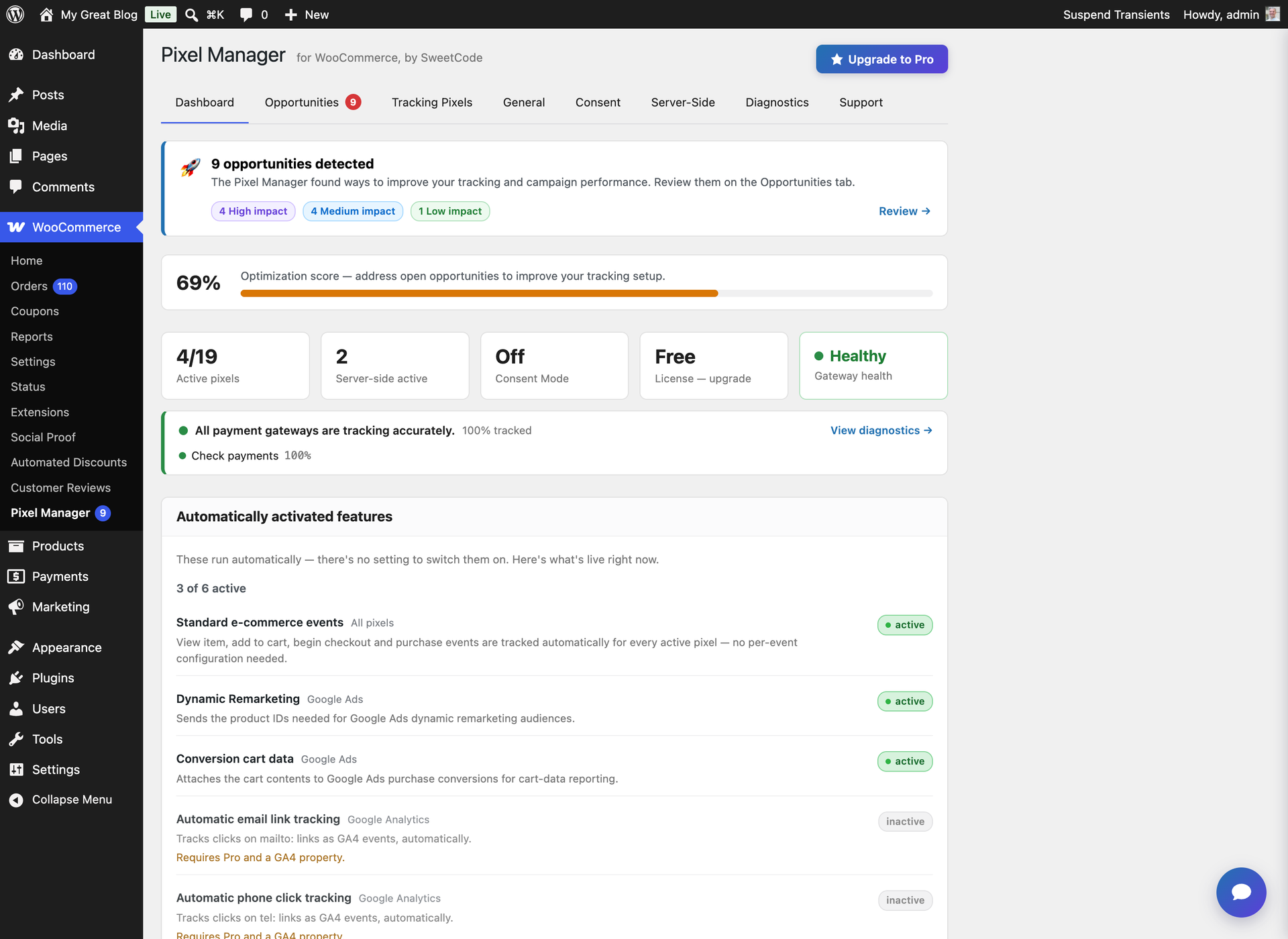
- Nova admin interface – rebuilt from the ground up, faster and cleaner, with a getting-started checklist for new installs
- Abilities API integration – AI agents (Claude, ChatGPT, and others) can discover, read, and safely update your tracking settings
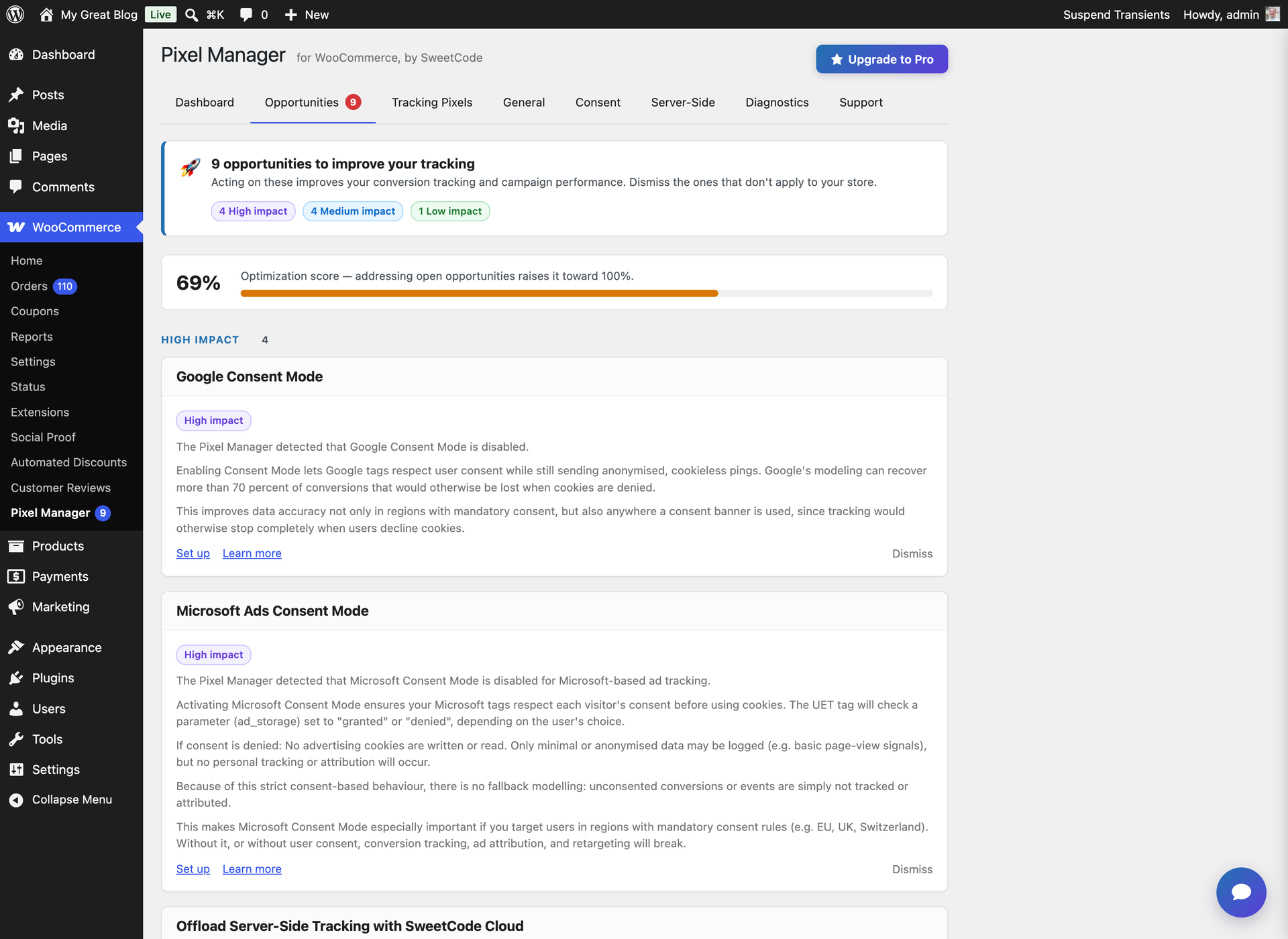
- Opportunities – prioritized, actionable suggestions to improve your tracking and campaign performance
Have a look at the full feature list over here.
Premium Tracking Pixels
- AB Tasty – A/B testing and personalization (beta)
- Adroll Ads
- AppLovin – conversion tracking through the AppLovin (Axon) pixel, with the full shopping funnel and server-side events through the Conversion API (beta)
- Contentsquare Statistics
- CrazyEgg Analytics
- Criteo Ads – retargeting and audience events through the Criteo OneTag (beta)
- GroundTruth Ads – omnichannel engagement and conversion tracking (beta)
- Hyros – ad attribution through the Hyros Universal Script with funnel milestone tags (beta)
- LinkedIn Ads
- Microsoft Clarity – heatmaps and session recordings with e-commerce events (beta)
- Mixpanel – product analytics with the full shopping funnel, server-side purchases through the Ingestion API, session replay and user identification (beta)
- Klaviyo – consent-gated onsite tracking alongside the Klaviyo plugin, with reliable Started Checkout on custom checkouts, cart, collection and search events, and server-side orders through the Events API (beta)
- Nextdoor Ads – conversion tracking through the Nextdoor Universal Pixel (beta)
- Optimizely – experimentation and feature testing (beta)
- Outbrain Ads
- Spotify Ads – conversion tracking through the Spotify Ad Analytics pixel, with the full shopping funnel and server-side events through the Conversions API (beta)
- Taboola Ads
- Triple Whale – browser pixel and checkout funnel for stores connected to Triple Whale (beta)
- X (Twitter) Ads
- VWO (Visual Website Optimizer) – A/B testing
Fonctionnalités premium
- Automatic Conversion Recovery (ACR) – automatically recover missed conversions nightly
- Server-side tracking (CAPI) – Meta, TikTok, Pinterest, Snapchat, Reddit, OpenAI, Nextdoor, Spotify, AppLovin, Microsoft Ads, GA4 Measurement Protocol
- Prévention avancée de la duplication des commandes
- Google Ads Enhanced Conversions – first-party data for improved attribution
- Google Ads Conversion Adjustments – send refund data back to Google Ads
- Scroll Tracking – measure how far visitors scroll on your pages
- Suivi automatique des appels téléphoniques et des clics sur les liens
- Customer Lifetime Value on orders – the basis for value-based bidding and high-value-customer audiences
- Always send server-side events – recover conversions even when the browser pixels never loaded
- Server-side PageView events – reliable PageViews for Meta and Snapchat when browser tracking is blocked
- Lazy-loading the tracking library – defer it to the first interaction for better page-speed scores
- Subscription value multiplier – report sign-ups at their expected lifetime value
- Disable tracking for specific user roles – keep staff and test accounts out of your data
- Google TCF support – IAB Transparency and Consent Framework support for Google tags
Have a look at the full feature list over here.
Ready to recover lost conversions and get accurate tracking data? Visit sweetcode.com to learn more about the Pro version.
Documentation
Comprehensive setup guides, troubleshooting, and API references: Open the documentation
News
Gestion du consentement
The Pixel Manager integrates with all major Consent Management Platforms (CMPs) to ensure your tracking pixels respect visitor consent choices. It supports Google Consent Mode v2, including region-specific consent defaults for the EU, UK, and US states with privacy regulations.
Compatible consent management plugins:
- Beautiful and Responsive Cookie Consent
- Cookiebot
- Cookie Confirm
- Cookie Script
- Complianz GDPR/CCPA Cookie Consent
- Cookie Notice
- Cookie Notice & Compliance for GDPR / CCPA
- Cookie Law Info
- FAZ Cookie Manager
- GDPR Cookie Compliance
- WP AutoTerms
- CookiePro by OneTrust
- Termly
- Iubenda
- WP Consent API
- WP Cookie Consent
Please read the following for additional setup information
Prérequis
Niveau sécurité
Bien que nous suivions les meilleures pratiques en matière de sécurité, nous voulions nous assurer que nous n‘avons rien manqué. Nous avons donc demander son avis sur l‘extension à Patchstack, une entreprise de cybersécurité spécialisée dans la sécurité de WordPress.
Le résumé de leur rapport est le suivant : « Nous n‘avons pas été en mesure de détecter des vulnérabilités qui auraient un impact sérieux sur l‘état de sécurité de l‘extension ».
Programme de gestion de divulgation des vulnérabilités
Nous nous engageons à assurer la sécurité de nos clients et clientes et de leurs données. Si vous pensez avoir trouvé une vulnérabilité de sécurité dans Pixel Manager for WooCommerce, nous vous encourageons à la signaler par l‘intermédiaire de Patchstack notre partenaire de sécurité. Patchstack gère un programme de divulgation des vulnérabilités géré (mVDP) qui nous aide à recevoir, trier et répondre aux vulnérabilités signalées. Patchstack offre également une récompense pour la divulgation responsable des vulnérabilités de sécurité. Rapport d‘une vulnérabilité
Captures d’écran
Installation
Téléversez le répertoire de l’extension dans votre répertoire d’extensions
/wp-content/plugins/Activez-la via le menu Extensions dans l’admin WordPress
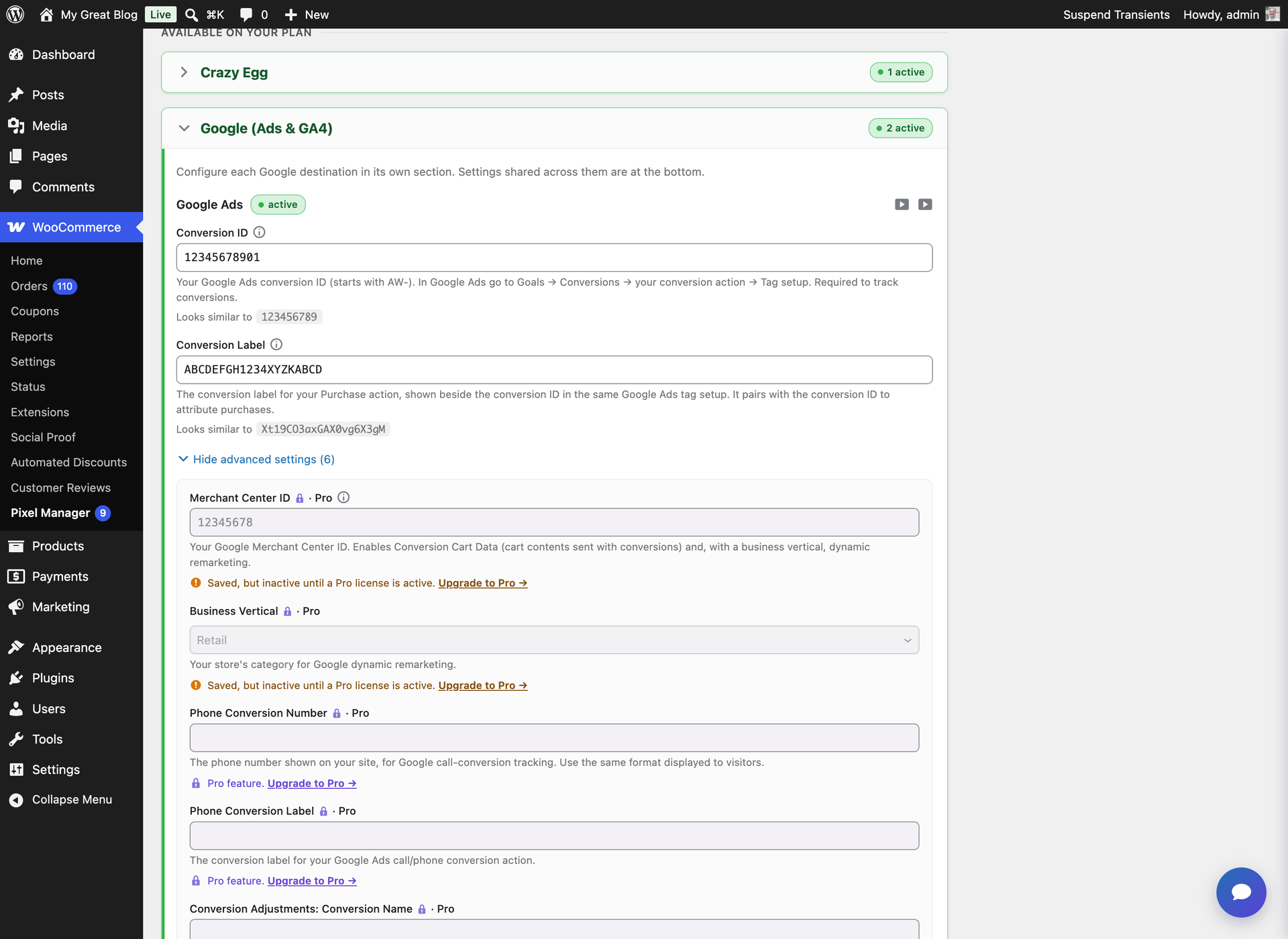
Obtenez l’ID de conversion de Google Ads et le libellé de conversion. Vous trouverez les deux valeurs dans le code de suivi de la conversion de Google Ads. Consultez l’ID de conversion et le libellé de conversion.
In the WordPress admin panel go to WooCommerce Pixel Manager, open the ‘Tracking Pixels’ tab and expand the ‘Google (Ads & GA4)’ section. Please enter the conversion ID and the conversion label into their respective fields.
Consultez notre documentation et suivez nos guides d‘installation. Voici quelques-uns de nos guides les plus populaires :
And read through our FAQ.
FAQ
-
How does Pixel Manager compare to Google Tag Manager (GTM)?
-
While Google Tag Manager is free, it requires significant technical expertise and many hours of configuration to set up proper WooCommerce e-commerce tracking. You need to create custom data layers, configure triggers and tags for each platform, handle consent mode integration manually, and test extensively to avoid tracking errors. The Pixel Manager provides a turnkey alternative that’s optimized specifically for WooCommerce with over 12 years of development. It automatically configures the correct e-commerce events, handles edge cases like payment gateway redirects and order deduplication, and includes unique features like Automatic Conversion Recovery (ACR) and the Payment Gateway Accuracy Report that GTM cannot replicate. Most users find Pixel Manager saves dozens of hours compared to manual GTM setup, while delivering more accurate conversion data.
-
What is server-side tracking (Conversion API / CAPI) and why does it matter?
-
Server-side tracking sends conversion data directly from your WooCommerce server to advertising platforms like Meta (Facebook), TikTok, Pinterest, Snapchat, Reddit, OpenAI, and Google Analytics 4 – rather than relying solely on browser-based pixels. This results in more reliable, accurate tracking because it works even when browser tracking is limited by ad blockers, Safari ITP cookie restrictions, browser privacy settings, VPNs, or network issues. Our Pro version typically recovers up to 30% more conversions compared to browser-only tracking, directly improving your campaign optimization and ROAS calculations.
-
Can I track conversions from OpenAI ads on ChatGPT?
-
Yes. The Pro version includes an OpenAI tracking pixel with browser-side conversion tracking, a server-side Conversions API connection, and Advanced Matching for improved event matching. You only need to enter your OpenAI pixel ID and, for server-side tracking, a Conversions API token. Purchase conversions are always sent server-side for maximum reliability, so you can accurately measure which sales your ads on ChatGPT generate.
-
How does Automatic Conversion Recovery (ACR) work?
-
ACR is our unique Pro feature that automatically recovers conversions missed due to tracking issues – whether from payment gateway redirects (like PayPal), browser limitations, ad blockers, or network problems. It runs nightly using the WordPress Action Scheduler, identifies WooCommerce orders that weren’t properly tracked by your advertising pixels, and sends the conversion data to your advertising platforms retroactively (within the allowed attribution windows). This can recover approximately 50% of otherwise lost conversions, directly improving your Google Ads, Meta, and TikTok campaign performance.
-
Does the Pixel Manager support Google Consent Mode v2?
-
Yes. The Pixel Manager fully supports Google Consent Mode v2, including the new
ad_user_dataandad_personalizationparameters required by Google since March 2024. It also supports region-specific consent defaults for the EU, UK, and 11+ US states with privacy regulations. The plugin integrates with 15+ consent management platforms (CMPs) out of the box, automatically adjusting tracking behavior based on visitor consent choices. This ensures your WooCommerce store is compliant with GDPR, CCPA, and other privacy regulations while still collecting the maximum amount of conversion data allowed. -
What WooCommerce e-commerce events does the Pixel Manager track?
-
The Pixel Manager tracks the complete e-commerce customer journey: product list views (impressions), product detail views, add to cart, remove from cart, begin checkout, add payment info, and purchase events. These events are sent simultaneously to all configured tracking pixels (Google Ads, GA4, Meta, TikTok, etc.) with standardized product data including product ID, name, category, brand, price, and quantity. This comprehensive event tracking powers Google Analytics GA4 Enhanced E-Commerce reports, Google Ads Smart Shopping and Performance Max campaigns, Meta dynamic remarketing ads, and TikTok product catalog campaigns.
-
Can I use the Pixel Manager to track Google Ads conversions on WooCommerce?
-
Yes. The Pixel Manager makes Google Ads conversion tracking setup on WooCommerce straightforward. Simply enter your Google Ads Conversion ID and Conversion Label, and the plugin automatically tracks purchase conversions with accurate order values, fires dynamic remarketing events for audience building, sends cart item data to optimize Performance Max and Shopping campaigns, tracks the Google Shopping new customer parameter for new customer acquisition campaigns, and supports Enhanced Conversions (Pro) for improved attribution using first-party data.
-
Will the Pixel Manager slow down my WooCommerce store?
-
No. Performance is a core design priority. The back-end code is small and efficient with fast, cached database queries. Larger tasks like ACR processing run during off-peak hours using the WordPress Action Scheduler. The front-end JavaScript library is compiled, tree-shaken to only load code for active pixels, minified, and pre-compressed with gzip and brotli. The Pro version adds lazy loading of the tracking library to further reduce impact on page load time. Many users report the Pixel Manager is faster than alternative tracking plugins and significantly lighter than a comparable Google Tag Manager setup.
-
Existe-t-il une documentation détaillée pour l’extension ?
-
Yes. Head over to this link: Documentation
-
Comment puis-je vérifier si l’extension fonctionne correctement ?
-
- Désactivez tout type d’extension de mise en cache et/ou de minification.
- Déconnectez-vous de la boutique.
- Désactivez tout type de bloqueur de publicité ou de script dans votre navigateur.
- Cherchez un de vos mots-clés et cliquez sur une de vos publicités.
- Achetez un article dans votre boutique.
- Attendez jusqu’à 48 heures que la conversion apparaisse dans les publicités Google. (en général, cela ne prend que quelques heures)
Grâce à l’assistant Google Tag, vous pourrez également voir la balise déclenchée sur la page de remerciement.
-
HPOS (High Performance Orders Storage)
-
Pixel Manager est prêt pour la nouvelle fonctionnalité WooCommerce High Performance Orders Storage (HPOS).
-
Compatibilité de l‘extension
-
Notre extension est conçue pour fonctionner sans problème avec 99,99 % des autres extensions. Dans le cas rare d‘un conflit avec une extension tierce, nous identifions généralement rapidement un correctif ou une solution de contournement.
Pour illustrer sa large compatibilité, voici quelques exemples d’extensions tierces qui fonctionnent bien avec Pixel Manager :
- Javascript asynchrone
- Optimisation automatique
- CartFlows
- Extension Cloudflare
- Cost of Goods for WooCommerce (WPFactory)
- Doofinder for WooCommerce
- FlyingPress
- Hummingbird
- Litespeed Cache
- Litespeed ESI
- NitroPack
- Siteground Optimizer
- W3 Total Cache
- WooCommerce Brands
- WooCommerce Composite Products
- WooCommerce Cost of Goods (SkyVerge)
- WooCommerce Deposits
- WooCommerce Google Product Feed
- WooCommerce Subscriptions
- WooCommerce Wishlists
- Woo Discount Rules
- WP Fastest Cache
- WP Marketing Robot Feed Manager
- WP Optimize
- WP Rocket
- WP Super Cache
- YITH WooCommerce Brands
- YITH WooCommerce Wishlist
Rassurez-vous, il ne s’agit que d’un petit échantillon, et Pixel Manager devrait s’intégrer sans difficulté avec presque toutes les autres extensions que vous pourriez utiliser.
-
Avez-vous des vidéos expliquant comment configurer l‘extension et en tirer le meilleur ?
-
Yes, they are part of the step by step documentation. Head over to this link: Documentation
-
J’ai une erreur fatale et j’utilise d’anciennes versions de WordPress et/ou de WooCommerce. Que puis-je faire ?
-
Comme il s’agit d’une extension gratuite, nous ne supportons pas les anciennes versions de WordPress et WooCommerce. Vous devrez mettre à jour votre installation.
-
J’utilise une passerelle de paiement hors site et les conversions ne sont pas suivies. Que puis-je faire ?
-
Offsite payment gateways (like PayPal Standard) redirect visitors away from your WooCommerce store during checkout, which can prevent browser-based conversion tracking from firing. The free version cannot fully solve this, but the Pro version’s Automatic Conversion Recovery (ACR) feature specifically addresses this problem by detecting untracked orders and sending the conversion data server-side. We generally recommend using direct payment gateways (like Stripe, PayPal Commerce Platform, or Mollie) for the best tracking accuracy and higher conversion rates.
-
J’ai tout fait correctement dans le test, mais ça ne marche toujours pas. Que puis-je faire ?
-
Voici une liste non exhaustive des causes qui pourraient interférer avec le code de l’extension.
- Les extensions de minification essaient de minifier le code JavaScript de l’extension. Toutes les extensions de minification ne le font pas assez bien et peuvent causer des problèmes. Désactivez la minification JavaScript et essayez à nouveau.
- La mise en cache peut également poser des problèmes si les réglages sont trop agressifs. En général, n’activez jamais la mise en cache HTML sur une boutique WooCommerce, car elle peut causer des problèmes avec les extensions qui génèrent une sortie dynamique.
-
Je vois des problèmes dans l’administration de ma boutique. Les pages d’administration deviennent bizarres, et les popups ne disparaissent pas lorsque je clique pour les fermer. Comment puis-je résoudre ce problème ?
-
Vous avez probablement activé un bloqueur de script ou de publicité. Désactivez-le et les problèmes devraient disparaître. En général, vous pouvez désactiver le bloqueur pour ce site particulier (votre administration WooCommerce).
Notre extension injecte des pixels de suivi sur l’interface publique des boutiques WooCommerce. En conséquence, les scripts de notre extension ont été ajoutés à certaines listes de filtres de confidentialité. L’idée est d’empêcher l’exécution des scripts si un visiteur de la boutique a activé un bloqueur de publicité et souhaite visiter l’interface publique de la boutique. Ceci est tout à fait acceptable pour les visiteurs de la boutique. Mais cela devient un problème pour les administrateurs de la boutique qui ont un bloqueur activé dans leur navigateur et qui se rendent dans l’administration de la boutique.
Malheureusement, il n’y a aucun moyen pour nous d’approuver de manière générale nos scripts dans tous les bloqueurs pour l’administration de WooCommerce.
Nous recommandons donc aux admins de la boutique d’exclure leur propre boutique du bloqueur dans leur navigateur.
-
Où puis-je signaler un bogue ou suggérer des améliorations ?
-
Veuillez signaler votre problème dans le forum de support de Pixel Manager for WooCommerce : lien
Vous pouvez également envoyer le lien vers la page d’accueil de votre boutique si vous pensez que cela pourrait vous être utile. -
How can I report security bugs?
-
You can report security bugs through the Patchstack Vulnerability Disclosure Program. The Patchstack team helps validate, triage, and handle any security vulnerabilities. Report a security vulnerability.
Avis


Contributeurs & développeurs
« Pixel Manager for WooCommerce – Conversion Tracking, Google Ads, GA4, TikTok, Dynamic Remarketing » est un logiciel libre. Les personnes suivantes ont contribué à cette extension.
Contributeurs


“Pixel Manager for WooCommerce – Conversion Tracking, Google Ads, GA4, TikTok, Dynamic Remarketing” a été traduit dans 9 locales. Remerciez l’équipe de traduction pour ses contributions.
Le développement vous intéresse ?
Parcourir le code, consulter le SVN dépôt, ou s’inscrire au journal de développement par RSS.
Journal
1.72.0
Release date – 04.11.2026
- New: Each configured pixel now has an on/off switch that pauses it without losing its settings, stopping both browser and server-side tracking until it is resumed. Paused pixels are marked clearly on the Tracking Pixels tab, the Dashboard and the WordPress dashboard widget
- New: view_item_list now sends one event per product list with every item and its position, instead of one event per product, to GA4, Google Ads, Klaviyo, Mixpanel and Criteo. Related products and theme or page builder widgets such as WoodMart’s count as their own lists, and grouped events still go out when the visitor leaves the page
- Tweak: The payment gateway tracking accuracy report now warns when on-site gateways such as Stripe and WooPayments measure no orders at all. That points at a firewall or cache rule blocking the order confirmation beacon, or the Pixel Manager script not running on the order received page, not at a payment redirect
- Tweak: The Google Tag Gateway proxy now logs requests without a valid tag ID, which crawlers send to the gateway URL, at debug level instead of as warnings, so they no longer flood the debug log
- Tweak: When a theme or plugin deregisters jQuery or wp-hooks, WordPress silently drops the Pixel Manager script and no pixel loads; the debug info and the Diagnostics tab now report it and name the missing script
- Tweak: The debug info now notes that a failing purchase confirmation page HTTP status was tested server side, since firewalls and bot protection often block such requests while buyers load the page fine
- Tweak: The tracking pixel search now also finds pixels by the names people know them under, so searching for ChatGPT shows the OpenAI pixel
- Tweak: Every user now gets the Nova settings interface, and the switch back to the Classic interface is gone from the Support page. If Nova runs into a problem on a site, the
pmw_use_classic_admin_interfacefilter brings back the Classic interface - Tweak: With the logger on (pmwloggeron), the order confirmation page now says when the order duplication prevention held back an already reported purchase, and names the nodedupe parameter that tests it again
- Tweak: The browser console now warns when the data layer is on a page but the Pixel Manager library did not start, for example because the server sends its script compressed without a Content-Encoding header
- Fix: WooAds no longer reports a missing TikTok pixel on shops where the Pixel Manager runs TikTok. The TikTok for WooCommerce pixel code is now hidden only on storefront requests, where its tracking stays off
- Fix: Reddit for WooCommerce no longer sends its base pixel, purchase and Conversions API events next to the Pixel Manager’s Reddit pixel, and Snapchat for WooCommerce is now switched off the same way when the Pixel Manager runs Snapchat
- Fix: When another plugin or a script optimizer keeps a WordPress core script such as wp-components from loading, the settings page now names the missing script and how to fix it, instead of crashing with a generic interface error
- Fix: The standalone Google Tag Gateway proxy now passes its health check when logging is set to info or debug. The check crashed, so the Google tag went through the slower WordPress handler instead
- Fix: When the standalone Google Tag Gateway proxy fails to serve the Google tag, it now loads through the WordPress handler before falling back to Google directly, and the visitor’s next pages skip the failed proxy instead of failing the same way
- Fix: The payment gateway tracking accuracy report now counts a gateway as active when it received orders in the last 30 days, so orders that a disabled legacy plugin still files under its ID, such as stripe_cc, no longer drop out of the active view and the weighted accuracy
- Fix: The payment gateway tracking accuracy report no longer shows a gateway above 100%. An order whose payment method changed after payment now moves its total to the new gateway, and two confirmations arriving at once, or an order placed before the Pixel Manager was active, no longer count as an extra tracked order
- Fix: The Environment card on the Diagnostics page now shows the same WordPress memory limit as the debug info, the higher of WP_MEMORY_LIMIT and the PHP memory_limit, instead of the WP_MEMORY_LIMIT constant alone
- Fix: Usercentrics Accept, Deny and Save choices now reach the Pixel Manager. With current Usercentrics versions, Meta and other marketing pixels stayed off on the page where the visitor accepted, and from the next page on they loaded even for visitors who had denied
- Fix: One rate-limited or failed request no longer moves the visitor’s whole session from the REST API to admin-ajax.php. Only a network error or a missing or blocked REST route does that now; anything else falls back for that request alone
- Fix: On shops that ask for consent first, pixels such as Meta that load when the visitor accepts the banner now receive the landing page view and product view of that page, once and with the original event IDs, so ad landing pages are tracked
- Fix: GA4 view_item_list and select_item events now send each product’s list position as the item index, which a field name mismatch had dropped. The index counts from 0, as GA4 expects, also on search results
- Fix: Pinterest product views are sent as PageVisit again instead of ViewContent, on the tag and the Conversions API. Pinterest requires PageVisit with a product ID for the Verified Merchant Program and catalog sales campaigns, and has flagged such tags as needing attention since 1.67.0
1.71.0
Release date – 20.10.2026
- Tweak: The tracking library loaded on every shop page is about 40% smaller, with IP and location lookups loading only on shops that use the IP exclusion list or region-based consent. Pixel code now downloads while the cookie banner check runs, so pixels start sooner
- Tweak: The Meta Purchase now carries the order number as order_id, which Events Manager listed as unavailable
- Tweak: Cookies the Pixel Manager writes in the browser now carry the Secure attribute on HTTPS pages, which PCI compliance scans check for
- Fix: The standalone Google Tag Gateway proxy no longer stops working a week after the last settings change, when it answered every request with a 503 and the Google tag loaded directly from Google instead
- Fix: The Google Tag Gateway service worker now registers with every gateway handler. The WordPress handler still logged a service worker scope error on every page after the 1.70.0 fix, and the standalone proxy answered the worker with a 400 error
- Fix: The standalone Google Tag Gateway proxy now works when WordPress core sits in its own subdirectory or the content folder is not named wp-content, as on Bedrock, instead of sending every request through the slower WordPress handler
- Fix: The standalone Google Tag Gateway proxy now sends empty POST requests with a length. Google refused them with a 411 error
- Fix: IP ranges in CIDR notation from the
pmw_ip_exclusion_listfilter now exclude the visitor in the browser too. A range broke the browser check, so only exact IPs stopped the browser pixels - Fix: Pinterest checkout starts now carry each product’s category and brand, and over the Conversions API also its price, quantity and name, which Pinterest reported as missing
- Fix: Settings saved through the admin REST API are now checked against each setting’s type, and a save that names a whole group of settings validates every field inside it, Pro licensing included. A malformed save could store a list as the Google Tag Gateway path, which broke every shop page on PHP 8
- Fix: Server-side requests to ad platforms and the debug report’s connection checks now always verify the TLS certificate. A crafted request header or a private server IP could switch the check off, and only sites set to the local environment type skip it
1.70.0
Release date – 13.10.2026
- New: With Explicit Consent Mode off, the Pixel Manager now applies the cookie banner’s own pre-decision state, so opt-in banners from Complianz, Cookiebot, CookieYes, OneTrust, iubenda, Usercentrics and others no longer let pixels fire before the visitor answers. For banners that load asynchronously it waits up to two seconds for their answer
- New: The debug report lists the other active Google Analytics, Google Tag Manager and ad pixel plugins, so a second tracking setup shows up in the first support reply
- New: AI agents can now do everything the admin offers through the Abilities API, from backups, imports and logs to opportunities, SweetCode Cloud and the Google and Meta account connections, with exactly the access their user has in the admin, shop managers included. All abilities appear on the WordPress MCP Adapter’s default server
- Tweak: The Meta Conversions API Gateway and Event Setup Tool checks run daily instead of weekly, and both cards say that Meta can keep reporting a removed setup for a while
- Tweak: A settings save that a security plugin or host firewall blocks before it reaches WordPress now says so and names the blocked request, instead of showing « API error 403 »
- Tweak: A Nova page that hits an error no longer takes down the whole admin. Only that page is replaced by a request to contact support, with a button that copies the error details
- Tweak: With Explicit Consent Mode on, click IDs from the landing page URL are no longer stored in the browser before the visitor allows marketing. In every mode, declining or withdrawing marketing consent removes the stored click IDs
- Tweak: Updated Freemius SDK to the latest version
- Fix: The Google setup assistant now shows which permissions you allowed on Google’s consent screen and what stops working for the ones you declined. Reconnecting asks for the declined permissions again instead of silently reusing the earlier choice
- Fix: Google Ads conversions with cart data no longer deduct coupons twice. Item prices are now sent before coupons, as Google requires, because Google subtracts the order discount from the cart itself
- Fix: Beautiful and Responsive Cookie Consent’s built-in Pixel Manager integration no longer saves a permanent consent record that overrides the banner, which could keep a visitor who allowed marketing denied on every page. Visitors already affected are fixed on their next page view
- Fix: Cookiebot declines, Cookiefirst decisions and Usercentrics saved selections now reach the Pixel Manager, and unnamed Cookiefirst and Cookie Compliance categories count as denied
- Fix: A pixel that never loads, for example Meta behind an ad blocker, no longer suppresses the page view of every other pixel. The page view waits only when server-side page views are active, for at most three seconds, and never for a pixel the visitor has not consented to
- Fix: GA4 keeps tracking when the shop’s server cannot reach Google to check the tag ID, and an ID Google rejects gets an admin notice that explains the GT- alternative. Shops that also send GA4 through another tag, such as a GTM container, may now see page views double and should keep one sender
- Fix: Visitors recognised as bots or excluded by the IP exclusion list no longer load any browser pixel, so GA4’s automatic page view and the Google Ads remarketing hit no longer reach Google for them
- Fix: The Pixel Manager log no longer stays empty when WooCommerce logging is disabled or its level threshold is higher, and the Logger card says where the entries go
- Fix: A failed cart sync request no longer clears the stored cart, so the next page still has cart data for checkout events, and its error message says the request only reads the cart
- Fix: With the order subtotal value logic, a Stripe fee paid out in another currency than the order, for example AED on a EUR order, is converted to the order currency before it is deducted. It used to be subtracted as is, which under-reported conversion values and turned small orders into zero
- Fix: Turning off order de-duplication or turning on HTTP request logging through the Abilities API now arms the same timers as the admin interface, so de-duplication comes back on after 6 hours and logging switches off after 12 instead of staying that way
- Fix: The Google Tag Gateway service worker registers again. Since 1.69.1 the gateway dropped the header Google sends to allow it, so every page logged a service worker scope error in the browser console
- Fix: The server-load warnings for the Tag Gateway path and the first Conversions API token now appear when you leave the field, instead of interrupting your typing after the first character
- Fix: GA4
add_payment_infoevents include the selected payment method aspayment_typeagain, on the classic checkout and the Checkout block, and switching payment methods within a second is no longer dropped as a duplicate
1.69.2
Release date – 23.09.2026
- Tweak: Moved the code-scanner annotations in the free version onto their own lines, so the WooCommerce.com security audit no longer reports seven sinks that were already escaped or validated
1.69.1
Release date – 22.09.2026
- Fix: A post title can no longer break out of the data layer script. WordPress keeps the entities of a closing script tag in a title saved by a Contributor, and the plugin decoded them right before writing the title into its inline script, so the markup after that tag ran on every view of the post. Every inline script now escapes its angle brackets
- Tweak: Every value the plugin prints into a script, an attribute or a link now goes through the escaping function that fits that exact position, so a value that a validation rule stops today stays harmless if that rule ever loosens. None of the corrected sites was exploitable
- Fix: The browser-to-server event endpoint refuses a purchase named inside a pixel’s own object. It only checked the wrapper’s event field, so an unauthenticated request could hand a fabricated purchase with any value straight to a merchant’s Conversions API. Every pixel object is now searched for a purchase event name, and purchases only ever leave through the order hooks
- Fix: A URL that merely carries an order key no longer turns the front page, an archive or a search result into the order confirmation. The plugin printed that order’s customer data into whatever page the key was appended to, and looked the key up however it was shaped. Confirmation pages are also sent with no-cache headers now
- Fix: The public rate limits count the connecting address first. The visitor address comes from proxy headers any client can set, so a rotating header used to hand out a fresh allowance per request and write a database row for each one. A real proxy still gets an allowance per visitor behind it
- Fix: The Google Tag Gateway proxy no longer forwards the visitor’s WordPress login and WooCommerce session cookies to Google’s servers, no longer follows an upstream redirect on the server, and relays only the response headers a browser needs, so a policy header from upstream cannot apply to the shop’s own origin
- Tweak: A settings import now runs every field through the same validator as the settings page, drops keys that are not settings, refuses a schema version the plugin does not know and, on a free tier, keeps the stored values of Pro-only settings. It used to check that a few keys exist and store the file as it was
- Tweak: The products data layer cache is capped at 50 entries per page, an order key must look like one before it is looked up, click IDs from the landing URL are validated like those from cookies, the settings version can no longer be written as if it were a setting, log downloads are limited to the plugin’s own logs, the log redaction masks email addresses, and the Hyros referrer URL is encoded in full
1.69.0
Release date – 21.09.2026
- Fix: A product a shopper adds while the plugin is reading the cart stays in the cart. WooCommerce serves the plugin’s requests with the whole session loaded and writes all of it back at the end, so a request that only reads could still put the older cart back and the added item vanished in front of the shopper. The plugin’s requests now persist nothing, and the one that has to write refreshes the cart first
- Fix: On shops that run iubenda, the visitor’s consent is read at last. iubenda names its cookie after the site ID by default, and the Pixel Manager knew only the older cookie policy ID name, so every category stayed denied and every marketing pixel blocked. It now also reads iubenda’s legacy cookie, and ignores one that states no purposes instead of raising an error
- Fix: An interface whose name carries no
Interface_prefix is now found by the plugin’s autoloader. Three of them, among them the pixel adapter contract every server-side pixel implements, were reachable only because four places required their file by hand, so any other code path that touched them ended in a fatal error - Fix: A checkout started from the mini cart now carries the cart’s products, value and currency. The plugin left the cart empty while it re-read it from the server, and a checkout click is sent the moment it happens, so the event went out hollow on product and category pages
- Fix: An add to cart or add to wishlist event that reaches the Facebook pixel without product data no longer disappears. The adapter read the missing product and threw, so the event was lost from the browser pixel and the Conversions API alike. Meta needs the product on both events, so a productless one is now skipped cleanly
- Fix: The Diagnostics accuracy trend no longer crashes the admin interface when a custom date is typed rather than picked. A date field reports itself as empty for as long as a typed entry is incomplete, and that empty value reached the report’s date arithmetic while the page was being drawn, so the whole interface dropped to its error screen
- Fix: A blocked Google tag no longer fills the shop’s error tracking with stackless noise. When a content blocker kept the tag from loading, every Google Ads and Google Analytics event raised a promise rejection that carried no message at all, so the recorded entries named neither a cause nor a source. The wait now fails with a reason, and every event handles it
- Fix: The Google Tag Gateway health check can no longer be answered from a cache. It carried no cache headers at all, and a shop was found serving it from its CDN with a 30 day lifetime, so the check reported the gateway healthy by replaying the last time it had been
- Tweak: The Tag Gateway measurement path field now recommends an unguessable path instead of suggesting
/metrics. That is Google’s own example, so a great many shops share one predictable path, which is what makes a blocker rule worth writing against all of them at once
Earlier versions
For the changelog of earlier versions, please refer to the changelog in the /changelog-archive/ folder of the plugin or the full changelog on https://sweetcode.com/docs/pmw/changelog/free